


Common Audio Visual Cable Types and Where to Use Them in Commercial AV
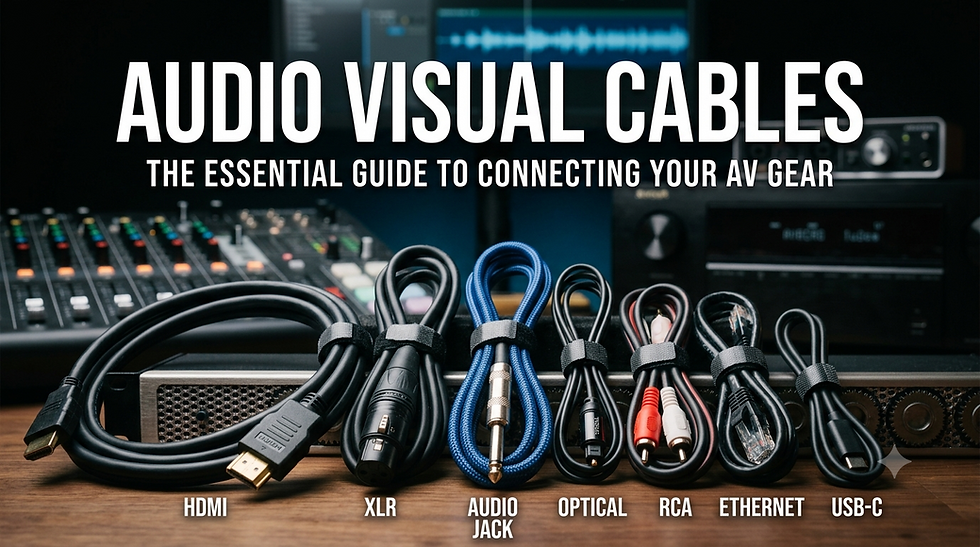
Audio visual cables are the backbone of every commercial AV installation, connecting displays, projectors, sound systems, control panels, and more. Whether you're designing a corporate boardroom, educational facility, or entertainment venue, understanding audio visual cables is critical to system performance, signal integrity, and long-term reliability. The importance of audio visual cables cannot be overstated. They determine video quality, audio clarity, latency, and overall system functionality. Choosing the wrong cable type can result in signal degradation, compatibility issues, and costly reinstallations. This guide explores the most common cable types for AV systems, where to use them, and how to select the right solution for your commercial projects.
Key Takeaways
✓ Understanding commercial AV cable types ensures optimal signal quality and system performance
✓ HDMI cables, SDI cables, and Cat6/Cat6a cables serve different applications based on distance, resolution, and bandwidth
✓ Proper cable management and installation practices extend system lifespan and reduce maintenance costs
✓ AV over IP solutions are transforming cable infrastructure requirements in modern installations
✓ Selecting the right cable gauge, shielding, and connector type prevents common AV failures
Why AV Cable Selection Is Important
Selecting the correct AV cabling infrastructure impacts every aspect of system performance. Poor cable choices lead to signal loss, electromagnetic interference (EMI), and latency issues that frustrate end users and damage integrator reputations.
According to Sound Sight Wave, proper AV system design delivers enhanced communication, collaboration, and user experience in commercial environments. The cable infrastructure forms the foundation of these benefits.
Beyond performance, cable selection affects installation costs, future scalability, and maintenance complexity. Modern 4K and 8K video transmission, networked audio, and control system integration demand cables that can handle higher bandwidths and longer distances than legacy analog systems. The Audiovisual and Integrated Experience Association (AVIXA) provides industry standards and best practices for professional AV installations.
Common Audio Visual Cable Types Explained
HDMI Cables
High Definition Multimedia Interface (HDMI) cables are the industry standard for transmitting uncompressed video and multi channel audio between devices. Available in Standard, High Speed, Premium High Speed, and Ultra High Speed versions, HDMI cables support resolutions from 1080p to 8K video with HDR and Dolby Atmos. The HDMI Licensing Administrator maintains the official specifications that ensure device compatibility across manufacturers.
SDI Cables
Serial Digital Interface (SDI) cables use coaxial construction to transmit uncompressed digital video over longer distances than HDMI. Common in broadcast environments and professional video production, 3G-SDI and 12G-SDI cables handle up to 4K 60fps with embedded audio and timecode. The Society of Motion Picture and Television Engineers (SMPTE) maintains these specifications to ensure interoperability across professional video equipment.
DisplayPort Cables
DisplayPort cables excel in computer to display connections, supporting multi stream transport (MST) for daisy chaining multiple monitors. DisplayPort 2.0 provides bandwidth up to 80 Gbps, enabling 8K 60Hz or dual 4K 144Hz displays. This makes DisplayPort particularly valuable in control room environments and digital signage applications.
VGA and DVI Cables
While increasingly obsolete, VGA cables (analog) and DVI cables (digital or analog) still appear in legacy systems. These video only cables require separate audio connections and lack support for HDCP content protection. Most modern AV projects phase out these technologies in favor of digital interfaces.
Cat6/Cat6a/Cat7 Network Cables
Twisted pair Ethernet cables have revolutionized AV distribution through AV over IP technology. Cat6a cables support 10 Gigabit Ethernet up to 100 meters, enabling 4K video streaming, Dante audio, and control system communication on converged networks. The Telecommunications Industry Association (TIA) defines performance requirements through the TIA/EIA 568 standard for structured cabling systems.
XLR Audio Cables
XLR cables provide balanced professional audio connections resistant to interference. The three pin connector design carries microphone level and line level audio in commercial sound reinforcement systems. Phantom power for condenser microphones also travels through XLR connections, making them essential for professional audio installations.
Speaker Cables
Speaker wire connects amplifiers to passive speakers using copper conductors. Wire gauge selection (12 AWG, 14 AWG, 16 AWG) depends on power levels and cable run length to minimize resistance and power loss. Proper gauge selection prevents amplifier strain and speaker damage.
Fiber Optic Cables
Fiber optic cables transmit video, audio, and data as light pulses through glass strands, immune to EMI and capable of distances exceeding kilometers. Single mode and multimode fiber serve different bandwidth and distance requirements. Fiber optic technology provides the most future proof infrastructure for large scale commercial installations.
Coaxial Cables
Coaxial cables like RG-6 and RG-59 carry RF signals, analog video, and SDI with good shielding against interference. They remain common in cable TV distribution and surveillance camera systems.
Where Each AV Cable Is Commonly Used
Corporate Boardrooms: HDMI for local connections, Cat6a for AV over IP distribution, XLR for conferencing audio
Education: DisplayPort for computer labs, HDMI for classroom displays, fiber for campus backbone
Houses of Worship: SDI for camera systems, Cat6a for streaming infrastructure, speaker cable for distributed audio
Hospitality: HDMI for in room entertainment, coax for RF distribution, fiber for property wide systems
Healthcare: Shielded cables for EMI sensitive environments, fiber for telemedicine, Cat6a for networked displays
Stadiums and Venues: Fiber for long distance video transport, Cat6a for control networks, professional audio cabling for sound systems
Interestingly, fire alarm system design considerations often intersect with AV cabling, requiring proper separation, conduit sharing protocols, and plenum rated cables to meet building codes established by the National Fire Protection Association (NFPA).
How to Choose the Right AV Cable
Resolution and Bandwidth: Match cable specifications to current and future video resolution needs (1080p, 4K, 8K)
Distance Requirements: Calculate exact cable run lengths and select technology capable of reliable transmission
Environment: Consider temperature ratings, flexibility, plenum ratings, and outdoor specifications
Interference: Evaluate shielding requirements based on proximity to power lines, fluorescent lighting, and wireless equipment
Budget vs Performance: Balance initial costs against long term reliability and future upgrade paths
Connector Quality: Specify gold plated contacts, proper strain relief, and manufacturer certifications
Installation Method: Consider in wall, conduit, cable tray, and accessibility for future maintenance
AV Cable Distance Limitations
Understanding maximum cable distances prevents signal degradation:
HDMI: 15 meters passive, extended via active cables or HDBaseT extenders
SDI: 100+ meters depending on resolution and cable quality
Cat6/Cat6a: 100 meters for Ethernet standards, extended via network switches
DisplayPort: 15 meters passive, longer with active optical cables
XLR Audio: 100+ meters with proper cable gauge and phantom power considerations
Fiber Optic: Up to 40 kilometers single mode, 2 kilometers multimode
Speaker Cable: Varies by amplifier power and impedance, typically under 30 meters
Common AV Cable Mistakes to Avoid
Undersizing Cable Bandwidth: Installing cables that barely meet current specs leaves no room for technology upgrades
Ignoring Bend Radius: Tight bends damage internal conductors and cause intermittent failures
Poor Termination: Improper connector installation creates contact resistance and signal reflections
Mixing Cable Categories: Combining shielded and unshielded cables creates ground loops and noise
Neglecting Testing: Failing to certify cable runs before system commissioning leads to difficult troubleshooting
Inadequate Documentation: Missing cable labels and infrastructure maps complicate future modifications
Best Practices for Commercial AV Cable Management
Cable Pathways: Use dedicated cable trays, J hooks, and conduits separate from electrical wiring
Service Loops: Leave 1 to 2 meters extra at each end for equipment changes and connector rework
Velcro Straps: Replace zip ties with reusable hook and loop fasteners for easier maintenance
Color Coding: Implement consistent cable jacket colors for quick identification (blue for video, red for audio, yellow for control)
Testing Protocol: Certify all cable runs with appropriate test equipment before final termination
Documentation: Create detailed as built drawings showing exact cable routes, types, and labeling schemes
Following BICSI (Building Industry Consulting Service International) standards for cabling installation ensures professional quality work that meets industry requirements for commercial environments.
Why AV Professionals Use XTEN AV for Commercial AV System Design

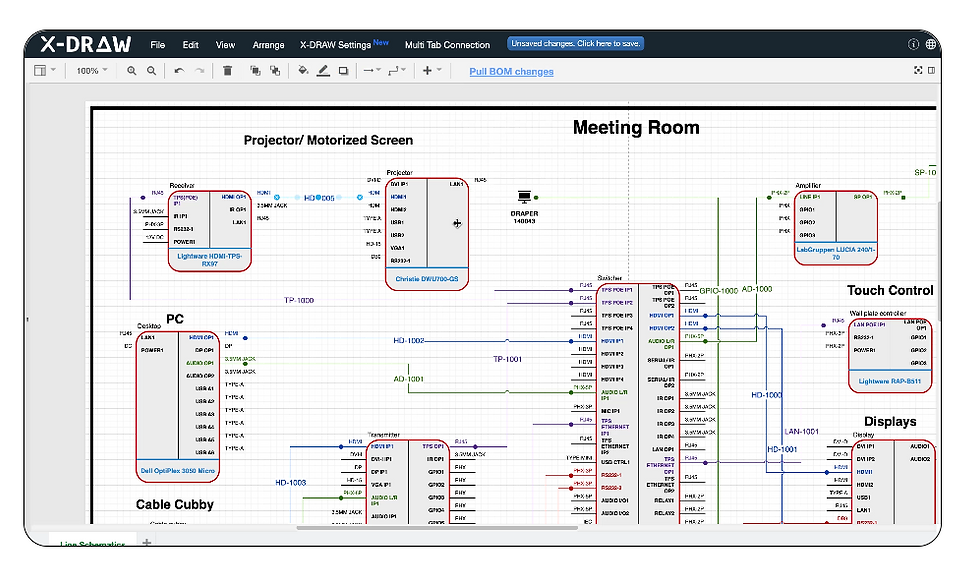
Modern AV projects demand sophisticated design software that handles complex signal routing, equipment specifications, and cable schedules. XTEN AV streamlines the design process with automated cable calculations, bill of materials generation, and integration with CAD platforms.
The software considers cable distance limitations, bandwidth requirements, and installation standards to recommend optimal cable types and quantities. This reduces design errors, material waste, and project delays while ensuring system performance meets client expectations.
Frequently Asked Questions (FAQs)
What is the best cable for 4K video in commercial AV?
Cat6a cables with AV over IP or HDBaseT provide the most flexible 4K distribution for commercial installations, supporting distances up to 100 meters with video, audio, control, and power over Ethernet (PoE).
How do I choose between HDMI and SDI cables?
Choose HDMI for consumer grade equipment and short runs under 15 meters. Select SDI for professional video production, broadcast environments, and installations requiring longer cable runs with embedded audio and timecode.
What cable gauge should I use for speaker wire?
Use 12 AWG for runs over 15 meters or high power applications, 14 AWG for medium distances and power, and 16 AWG for short runs under 7 meters with lower power requirements.
Can I run AV cables in the same conduit as power cables?
Generally no. Electrical codes typically require separation between low voltage AV cables and AC power wiring to prevent electromagnetic interference. Check local codes and use shielded cables when proximity is unavoidable.
What does plenum rated cable mean?
Plenum rated cables use special fire resistant jackets that produce less smoke and toxic fumes during combustion. They're required in air handling spaces above suspended ceilings per building codes and fire safety regulations.
How often should I upgrade AV cabling infrastructure?
Plan for 10 to 15 year lifecycles for copper cabling and 20+ years for fiber optic infrastructure. However, prioritize forward looking specifications during initial installation to extend useful life.
What is the difference between shielded and unshielded cables?
Shielded cables include metallic foil or braided wrapping that blocks electromagnetic interference, essential near electrical equipment or in high EMI environments. Unshielded cables cost less but offer no interference protection.
Conclusion
Selecting appropriate audio visual cables requires understanding signal types, distance requirements, bandwidth specifications, and environmental factors unique to each commercial installation. From HDMI and SDI to Cat6a and fiber optics, each cable technology serves specific applications where its strengths provide optimal system performance and long term value.
Modern AV integrators must balance current client needs with future scalability, choosing cable infrastructure that supports emerging 4K and 8K standards, AV over IP architectures, and networked control systems. Proper cable management, installation techniques, and documentation practices ensure systems perform reliably throughout their lifecycle.
By following industry best practices, avoiding common mistakes, and leveraging design tools like XTEN AV, integrators deliver commercial AV systems that exceed client expectations and stand the test of time.


Comments